
What Spinclip does
Spinclip makes promo videos for music releases. Give it a cover image and a song; it renders a video with the cover over a blurred, stretched copy of itself and a visualizer that moves to the music — sized for each platform you pick.

Everything happens on your computer. Spinclip drives FFmpeg, which it brings along on Windows and macOS: there’s no account, no upload and no watermark.
The wizard
Section titled “The wizard”Spinclip is one window: a wizard on the left, and a live preview on the right that shows a real frame of the video you’re making. Below the preview, the Summary lists every choice; its pencil buttons jump straight to the step that sets it.
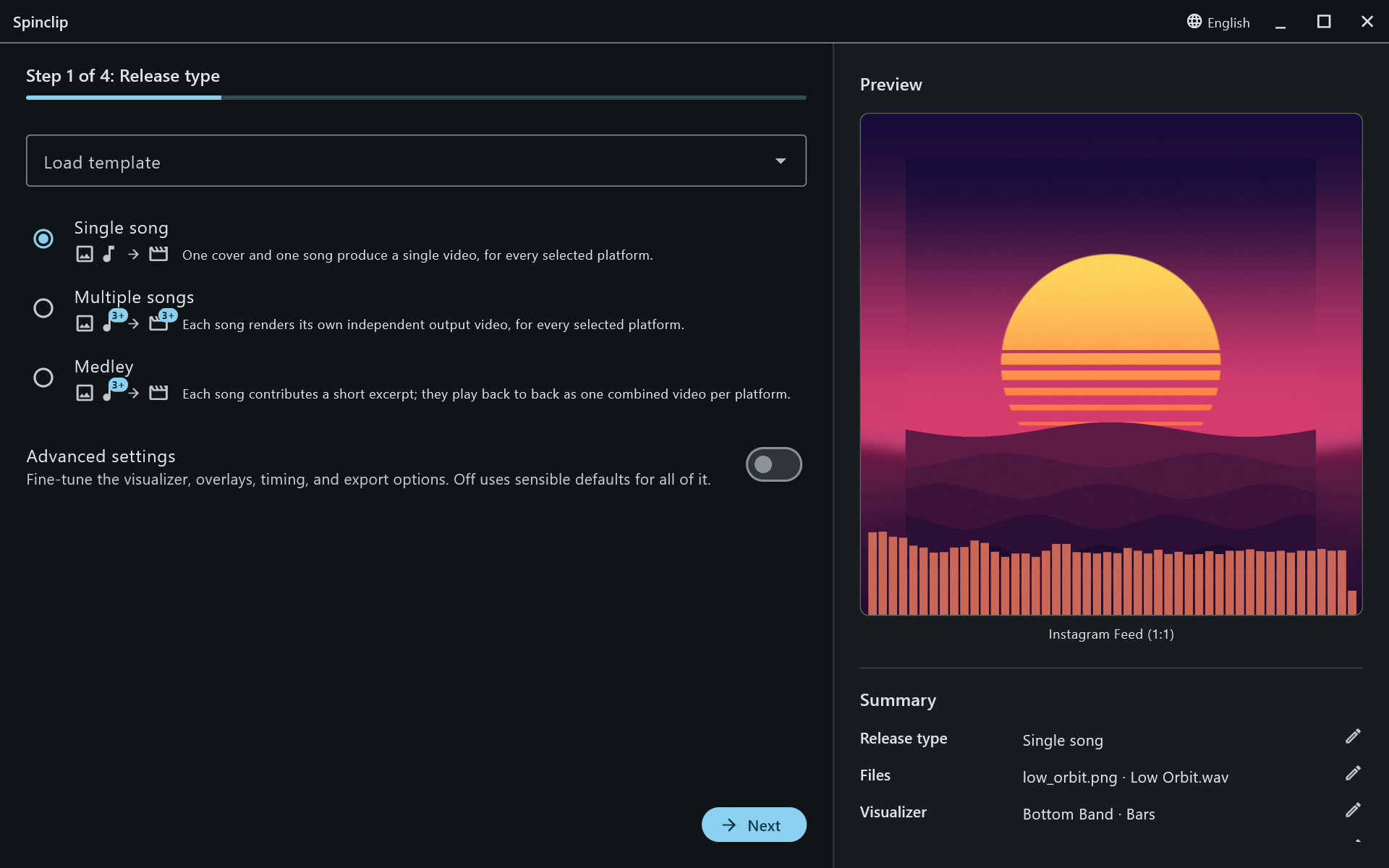
By default the wizard has four steps — the easy path:
- Release type — one song, several songs, or a medley.
- Files — the cover image and the song(s).
- Platforms — where the videos are going.
- Review & render.
Everything else uses a sensible default: Bars, 48 of them, along the bottom, in cyan, over the whole song. Turn on Advanced settings on the first step and four more steps appear: Visualizer, Customize, Duration (single songs only) and Output & performance.
What you get
Section titled “What you get”One video per platform you tick — or, for several songs, one per song per platform — in a folder named after the release. See Output & performance for where they go and what they’re called.
New here? Start with installation, then your first video.